Choosing the best MacBook laptops in 2027 means balancing raw processing power against battery life and portability. The Apple MacBook Pro 16.2-inch with M5 Pro stands out as the top overall choice for professionals who need sustained performance for video editing and coding. For those prioritizing portability without sacrificing speed, the Apple MacBook Air 15-inch with M5 Chip offers an exceptional middle ground. Meanwhile, budget-conscious buyers might find better value in renewed M1 models that still handle everyday tasks with ease. The main tradeoff lies in paying a premium for the latest silicon versus accepting older generations for significant savings. Continue reading to see how these options stack up against each other in detailed reviews.

Get your wardrobe favorites delivered free with Prime
- Fast, free delivery on millions of items
- Prime Video, Amazon Music and more included
- Member-only deals all year
Key Takeaways
- The M5 Pro chip delivers a noticeable leap in multi-core performance over the standard M5, making it worth the upgrade for heavy multitaskers.
- Renewed M1 MacBook Airs remain surprisingly viable for basic productivity, offering the lowest entry point into the Apple ecosystem.
- Display quality is the primary differentiator between the MacBook Air and MacBook Pro lines, with Pro models offering higher brightness and refresh rates.
- Memory configuration is more important than storage speed; 16GB RAM is the new baseline for future-proofing any 2027 MacBook.
- The 15-inch MacBook Air has emerged as the sweet spot for users who want screen real estate without the weight of a Pro model.
| Apple MacBook Neo 13-inch Laptop with A18 Pro Chip, 8GB Memory, 256GB SSD, Liquid Retina Display, Silver |  | Best Compact MacBook for Everyday Use | Display: 13-inch Liquid Retina | Processor: A18 Pro | Memory: 8GB unified memory | VIEW LATEST PRICE | See Our Full Breakdown |
| Apple 2026 MacBook Pro 16.3-inch PROLED XDR Display – Silver |  | Best Premium MacBook for Demanding Creative Work | Display: 16.3-inch PROLED XDR, tandem OLED | Processor: M5 Pro or M5 Max | Battery life: Up to 22 hours | VIEW LATEST PRICE | See Our Full Breakdown |
| Apple 2024 MacBook Pro 14-inch (M4 Pro, 12-Core CPU, 16-Core GPU, 24GB RAM, 512GB SSD, Space Black) |  | Best MacBook for Pro Work in a More Portable Size | Model year: 2024 | Display: 14.2-inch Liquid Retina XDR, up to 1600 nits peak brightness | Processor: Apple M4 Pro, 12-core CPU and 16-core GPU | VIEW LATEST PRICE | See Our Full Breakdown |
| Apple MacBook Air 13.3-inch (2020, M1, 8GB RAM, 128GB SSD), Space Gray (Renewed) | 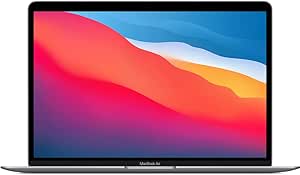 | Best Renewed MacBook for Basic Everyday Tasks | Model year: 2020 | Display: 13.3-inch Retina, 2560 × 1600 | Processor: Apple M1, 8-core CPU | VIEW LATEST PRICE | See Our Full Breakdown |
| Apple MacBook Air (13-inch Retina Display, 1.6GHz Dual-Core Intel Core i5, 128GB) – Gold (Renewed) |  | Best for Buyers Who Need a Basic Legacy Mac | Display: 13.3-inch Retina, 2560 × 1600 | Processor: 1.6GHz dual-core Intel Core i5 | Graphics: Intel UHD Graphics 617 | VIEW LATEST PRICE | See Our Full Breakdown |
| Apple MacBook Air 15-inch Laptop with M5 Chip, 16GB Memory, 512GB SSD |  | Best Large-Screen All-Rounder | Processor: Apple M5 chip | Memory: 16GB unified memory | Storage: 512GB SSD | VIEW LATEST PRICE | See Our Full Breakdown |
| Apple 2026 MacBook Air 13-inch Laptop (M5 Chip, 16GB RAM, 512GB SSD) |  | Best for Maximum Portability | Processor: Apple M5 chip | Memory: 16GB Unified Memory | Storage: 512GB SSD | VIEW LATEST PRICE | See Our Full Breakdown |
| 13-inch MacBook Air with M5, 32GB Memory, 512GB SSD |  | Best Portable Powerhouse | Processor: Apple M5 | Memory: 32 GB | Storage: 512 GB SSD | VIEW LATEST PRICE | See Our Full Breakdown |
| Apple MacBook Pro 16.2-inch with M5 Pro, 18-core CPU, 20-core GPU, 24GB Memory, 1TB SSD |  | Best Professional Creative Machine | Chip: Apple M5 Pro (18-core CPU, 20-core GPU) | Memory: 24GB Unified Memory | Storage: 1TB SSD | VIEW LATEST PRICE | See Our Full Breakdown |
| Apple MacBook Pro with M5 Pro, 48 GB unified memory, 2 TB SSD |  | Best for High-End Workflows | Processor: Apple M5 Pro (18-core CPU, 20-core GPU) | Memory: 48 GB unified memory | Storage: 2 TB SSD | VIEW LATEST PRICE | See Our Full Breakdown |
| Apple 2026 MacBook Pro Laptop with M6 Chip – Space Black |  | Best Next-Gen Performance | Processor: Apple M6 Chip | Display: 14.2-inch Liquid Retina XDR | Battery Life: Up to 24 hours | VIEW LATEST PRICE | See Our Full Breakdown |
| Apple MacBook Air 15-inch Laptop (M5 Chip, 32GB RAM, 1TB SSD, Midnight) |  | Best Premium Portable | Processor: Apple M5 chip (10-core CPU, 10-core GPU) | Memory: 32GB Unified Memory | Storage: 1TB SSD | VIEW LATEST PRICE | See Our Full Breakdown |
| Apple MacBook Air 15-inch with M5 chip, 32GB memory, 512GB SSD, Midnight |  | Best Value for Multitaskers | Chip: Apple M5 with 10-core CPU and 10-core GPU | Memory: 32GB | Storage: 512GB SSD | VIEW LATEST PRICE | See Our Full Breakdown |
| Apple MacBook Pro 14.2-inch with M5 Pro, 64GB RAM, 1TB SSD, Silver |  | Best Professional Workhorse | Chip: Apple M5 Pro | Memory: 64GB unified memory | Storage: 1TB SSD | VIEW LATEST PRICE | See Our Full Breakdown |
| Apple MacBook Pro 14-inch with M5 Pro, 18-core CPU, 20-core GPU, 64GB RAM, 1TB SSD, Space Black |  | Best Dark Mode Aesthetic | Processor: Apple M5 Pro, 18-core CPU | Graphics: 20-core integrated GPU | Memory: 64GB | VIEW LATEST PRICE | See Our Full Breakdown |
| MacBook laptop | Display | Weight | Memory | Storage |
|---|---|---|---|---|
| Apple MacBook Neo 13-inch Lapt | 13-inch Liquid Retina | 2.71 pounds | 8GB unified memory | 256GB SSD |
| Apple 2026 MacBook Pro 16.3-in | 16.3-inch PROLED XDR, tandem OLED | 4 pounds | — | — |
| Apple 2024 MacBook Pro 14-inch | 14.2-inch Liquid Retina XDR, up to 1600 nits peak brightness | 3.52 pounds | 24GB unified memory | 512GB SSD |
| Apple MacBook Air 13.3-inch | 13.3-inch Retina, 2560 × 1600 | — | 8GB | 128GB SSD |
| Apple MacBook Air | 13.3-inch Retina, 2560 × 1600 | 2.8 pounds | 8GB DDR3 SDRAM | 128GB SSD |
| Apple MacBook Air 15-inch Lapt | 15.3-inch Liquid Retina | 3.32 pounds | 16GB unified memory | 512GB SSD |
| Apple 2026 MacBook Air 13-inch | 13.6-inch Liquid Retina | 2.71 pounds | 16GB Unified Memory | 512GB SSD |
| 13-inch MacBook Air with M5 | 13.6-inch Liquid Retina | 2.71 pounds | 32 GB | 512 GB SSD |
| Apple MacBook Pro 16.2-inch wi | 16.2-inch Liquid Retina XDR | 4.71 pounds | 24GB Unified Memory | 1TB SSD |
| Apple MacBook Pro with M5 Pro | 16.2-inch Liquid Retina XDR | 9 pounds | 48 GB unified memory | 2 TB SSD |
| Apple 2026 MacBook Pro Laptop | 14.2-inch Liquid Retina XDR | 3.4 pounds | — | — |
| Apple MacBook Air 15-inch Lapt | 15.3-inch Liquid Retina | 1.51 kg | 32GB Unified Memory | 1TB SSD |
| Apple MacBook Air 15-inch with | 15.3-inch Liquid Retina | 1.51 kg | 32GB | 512GB SSD |
| Apple MacBook Pro 14.2-inch wi | 14.2-inch Liquid Retina XDR | 7.4 pounds | 64GB unified memory | 1TB SSD |
| Apple MacBook Pro 14-inch with | 14.2-inch Liquid Retina XDR | 8.5 pounds | 64GB | 1TB SSD |
More Details on Our Top Picks
Apple MacBook Neo 13-inch Laptop with A18 Pro Chip, 8GB Memory, 256GB SSD, Liquid Retina Display, Silver
The 13-inch MacBook Neo is the lightest-feeling choice here on paper, pairing a 2.71-pound aluminum body with a display sized for commuting, classes, and everyday tasks. Its A18 Pro chip and 1080p camera make it a more current, practical daily laptop than the renewed Intel MacBook Air, while the 256GB SSD doubles that older model’s listed storage. Up to 16 hours of battery life also suits a day away from an outlet. The tradeoff is its 8GB of unified memory, which gives demanding multitasking less room than the 24GB MacBook Pro 14-inch. I’d choose the Neo for portability and routine work, not sustained professional workloads or a large local media library.
Pros:- 2.71-pound aluminum design is easy to carry
- A18 Pro chip provides a current platform for everyday tasks
- 256GB SSD offers twice the listed capacity of the renewed Air models here
- 1080p camera and up to 16 hours of battery life suit mobile work
Cons:- 8GB of unified memory limits headroom for demanding multitasking
- 256GB storage may be restrictive for large photo, video, or app libraries
Best for: Students and mobile users who want a current, compact MacBook for browsing, documents, video calls, and everyday apps.
Not ideal for: Developers, creators, and heavy multitaskers who need more than 8GB of memory or substantial built-in storage.
- Display:13-inch Liquid Retina
- Processor:A18 Pro
- Memory:8GB unified memory
- Storage:256GB SSD
- Camera:1080p FaceTime HD
- Battery life:Up to 16 hours
- Weight:2.71 pounds
- Color:Silver
Our verdict“Choose the MacBook Neo for a portable, current everyday laptop, but pick the 24GB MacBook Pro 14-inch for heavier workloads.”
Apple 2026 MacBook Pro 16.3-inch PROLED XDR Display – Silver
This 16.3-inch MacBook Pro is the lineup’s large-screen production machine, built around a tandem OLED PROLED XDR display with up to 2000 nits of brightness and a stated 10,000,000:1 contrast ratio. That screen gives detailed visual work and HDR content more room and contrast than the 14.2-inch Liquid Retina XDR panel on the 2024 MacBook Pro. M5 Pro or M5 Max configurations, Neural Accelerators, and three Thunderbolt 5 ports target demanding graphics and AI workflows; the six-speaker system and 12MP Center Stage camera also suit a desk-based studio. The compromise is physical: at 4 pounds, it is less convenient to carry than the MacBook Neo. The listed processor options are broad, so buyers should confirm the exact configuration before choosing.
Pros:- 16.3-inch tandem OLED display offers high brightness and contrast
- M5 Pro or M5 Max options target graphics-intensive and AI workloads
- Three Thunderbolt 5 ports plus HDMI, SDXC, and MagSafe 3 support varied setups
- Up to 22 hours of battery life and a six-speaker sound system
Cons:- Four-pound weight makes daily carrying less convenient than smaller MacBooks
- M5 Pro and M5 Max are distinct configurations, so buyers need to verify which is included
- No legacy USB-A port for older accessories
Best for: Video editors, 3D artists, and AI-focused professionals who want a large, bright display and extensive high-speed connectivity.
Not ideal for: Frequent commuters or buyers whose work is mostly documents and web apps; the 16.3-inch chassis is larger and heavier than the MacBook Neo.
- Display:16.3-inch PROLED XDR, tandem OLED
- Processor:M5 Pro or M5 Max
- Battery life:Up to 22 hours
- Ports:Three Thunderbolt 5, MagSafe 3, SDXC, HDMI, headphone jack
- Wireless:Wi-Fi 7 and Bluetooth 6
- Camera:12MP Center Stage
- Audio:Six-speaker sound system
- Weight:4 pounds
Our verdict“Pick this MacBook Pro for a large-screen creative workstation; choose the 14-inch Pro if portability matters more.”
Apple 2024 MacBook Pro 14-inch (M4 Pro, 12-Core CPU, 16-Core GPU, 24GB RAM, 512GB SSD, Space Black)
The 2024 14-inch MacBook Pro is the balanced workhorse in this group: its M4 Pro chip, 24GB of unified memory, and 16-core GPU give demanding coding, rendering, and creative apps far more headroom than the MacBook Neo’s 8GB configuration. Its 14.2-inch Liquid Retina XDR display also brings strong brightness in a smaller footprint than the 16.3-inch 2026 Pro. That makes it easier to carry between a desk and a studio while retaining a pro-focused screen and performance tier. The tradeoffs are 512GB of storage, which may push large projects onto external drives, and a 3.52-pound weight that still exceeds the lightweight Air-style options. I’d favor it when performance matters more than minimal carrying weight.
Pros:- M4 Pro 12-core CPU and 16-core GPU suit demanding creative and coding work
- 24GB unified memory gives more multitasking headroom than the MacBook Neo
- 14.2-inch Liquid Retina XDR display reaches up to 1600 nits peak brightness
- Smaller and lighter than the 16.3-inch 2026 MacBook Pro
Cons:- 512GB SSD may be limiting for large media libraries and project files
- At 3.52 pounds, it is heavier than the Neo and renewed MacBook Air models
Best for: Developers, photographers, and creative professionals who need substantial memory and graphics capability in a laptop smaller than the 16-inch Pro.
Not ideal for: Casual users who mainly browse and write, or creators who need more than 512GB of internal storage without external drives.
- Model year:2024
- Display:14.2-inch Liquid Retina XDR, up to 1600 nits peak brightness
- Processor:Apple M4 Pro, 12-core CPU and 16-core GPU
- Memory:24GB unified memory
- Storage:512GB SSD
- Color:Space Black
- Dimensions:12.31 x 8.71 x 0.61 inches
- Weight:3.52 pounds
Our verdict“Choose this 14-inch Pro for serious workloads in a comparatively compact package, and look to the 16-inch Pro for more screen space.”
Apple MacBook Air 13.3-inch (2020, M1, 8GB RAM, 128GB SSD), Space Gray (Renewed)
This renewed M1 MacBook Air is the more sensible of the two older Airs here for buyers who want a familiar macOS laptop for basic school or home use. Its 8-core M1 CPU and 7-core GPU are a stronger foundation than the dual-core Intel processor in the renewed 2018 Air, and its 2560 × 1600 Retina display offers a sharp workspace. Touch ID and a backlit Magic Keyboard add useful daily conveniences, while the listed battery life reaches up to 18 hours. The catch is its age and tight configuration: 8GB of memory and a 128GB SSD leave little room for a growing app or file collection. Compared with the newer MacBook Neo, it has less storage and an older camera, so I’d choose it only for basic use and a renewed purchase.
Pros:- M1 8-core CPU and 7-core GPU outperform the dual-core Intel Air in this roundup
- High-resolution 13.3-inch Retina display
- Touch ID and backlit Magic Keyboard support everyday convenience
- Listed battery life is up to 18 hours
Cons:- 128GB SSD leaves little space for apps and local files
- 8GB memory limits heavier multitasking
- Renewed condition includes a 90-day limited warranty
Best for: Students or home users seeking a renewed MacBook for web browsing, writing, video calls, and lightweight apps.
Not ideal for: Buyers who keep large files locally, run demanding creative software, or prefer a newer model with a 1080p camera and more storage.
- Model year:2020
- Display:13.3-inch Retina, 2560 × 1600
- Processor:Apple M1, 8-core CPU
- Graphics:7-core integrated GPU
- Memory:8GB
- Storage:128GB SSD
- Battery life:Up to 18 hours
- Condition and warranty:Renewed; 90-day limited warranty
Our verdict“Choose this renewed M1 Air for basic tasks on a tight storage footprint, but the MacBook Neo is a better fit for buyers wanting newer hardware.”
Apple MacBook Air (13-inch Retina Display, 1.6GHz Dual-Core Intel Core i5, 128GB) – Gold (Renewed)
This renewed Intel MacBook Air earns a narrow place for buyers who need a basic legacy Mac for light web use, writing, or older workflows. Its 13.3-inch Retina display, Touch ID, and 2.8-pound body preserve the familiar Air format, but its 1.6GHz dual-core Intel Core i5 is a clear step down from the M1 MacBook Air’s 8-core CPU and from the A18 Pro MacBook Neo. That gap matters when juggling several apps or tackling newer demanding software. Storage is equally modest at 128GB, and the listed operating system is macOS 10.14 Mojave, so buyers should check software compatibility and update options for their needs. I’d treat it as a limited-use renewed option, not a forward-looking general-purpose MacBook.
Pros:- 13.3-inch Retina display offers 2560 × 1600 resolution
- Touch ID supports fingerprint authentication
- 2.8-pound design is reasonably portable
- Includes a 90-day limited warranty as a renewed product
Cons:- Dual-core Intel processor is substantially less capable than the M1 Air and MacBook Neo
- 128GB SSD and 8GB RAM constrain storage and multitasking
- Listed operating system is macOS 10.14 Mojave, which may not suit current software needs
Best for: Buyers needing a low-demand secondary Mac for basic browsing, documents, or older software that matches its listed system.
Not ideal for: Students and professionals buying a primary laptop for current apps, multitasking, or long-term use; the dual-core Intel chip and 128GB SSD are restrictive.
- Display:13.3-inch Retina, 2560 × 1600
- Processor:1.6GHz dual-core Intel Core i5
- Graphics:Intel UHD Graphics 617
- Memory:8GB DDR3 SDRAM
- Storage:128GB SSD
- Operating system:macOS 10.14 Mojave
- Weight:2.8 pounds
- Condition and warranty:Renewed; 90-day limited warranty
Our verdict“Choose this only for basic tasks or compatible legacy software; most buyers are better served by the M1 Air or MacBook Neo.”
Apple MacBook Air 15-inch Laptop with M5 Chip, 16GB Memory, 512GB SSD
This 15-inch MacBook Air stands out for balancing screen real estate with portability. It is significantly easier to carry than the 16.2-inch MacBook Pro models, yet offers more workspace than the 13-inch Air. The M5 chip handles multitasking and light creative work with ease, supported by 16GB of unified memory. While it lacks the dedicated HDMI and SD card slots found on the Pro lineup, its Thunderbolt 4 ports and MagSafe charging cover most daily needs. This pick makes the most sense for users who want a larger canvas for spreadsheets or video calls without the weight penalty of a professional-grade machine.Pros:- The 15.3-inch Liquid Retina display provides ample workspace for split-screen multitasking.
- At 3.32 pounds, it remains highly portable despite its larger footprint.
- Up to 18 hours of battery life supports full workdays without charging anxiety.
- The 12MP Center Stage camera and six-speaker system enhance remote collaboration.
Cons:- Only two Thunderbolt 4 ports limit direct connectivity for complex setups.
- 512GB of base storage may fill quickly for users with large media libraries.
- Lacks HDMI and SDXC ports, requiring dongles for professional peripherals.
Best for: Students and office professionals who prioritize a larger display for multitasking but still need a laptop light enough for daily commuting.
Not ideal for: Video editors or 3D artists who require the sustained thermal headroom and dedicated GPU power found in the MacBook Pro series.
- Processor:Apple M5 chip
- Memory:16GB unified memory
- Storage:512GB SSD
- Display:15.3-inch Liquid Retina
- Battery Life:Up to 18 hours
- Weight:3.32 pounds
- Ports:Two Thunderbolt 4, MagSafe, Headphone Jack
Our verdict“Choose this model if you want the best screen-to-weight ratio in the Air lineup for everyday productivity.”
Apple 2026 MacBook Air 13-inch Laptop (M5 Chip, 16GB RAM, 512GB SSD)
The 13-inch MacBook Air is the lightest option in this roundup, weighing just 2.71 pounds. Compared to the 15-inch Air, it sacrifices screen size for superior mobility, making it ideal for travelers who live out of a backpack. The M5 chip delivers the same core performance as its larger sibling, handling AI features and everyday tasks without thermal throttling. However, the smaller 13.6-inch display can feel cramped when managing multiple windows side-by-side. This model is better suited to those who value compactness over visual real estate and are comfortable using external monitors when stationary.Pros:- Extremely lightweight at 2.71 pounds, making it effortless to carry all day.
- The M5 chip provides robust performance for AI tasks and general productivity.
- Up to 18 hours of battery life ensures reliability on long trips.
- The compact chassis fits easily into smaller bags and tight workspaces.
Cons:- The 13.6-inch display offers less workspace than the 15-inch or Pro models.
- Only two Thunderbolt 4 ports restrict simultaneous connection of multiple high-bandwidth devices.
- The smaller screen may require frequent zooming or scrolling for detailed work.
Best for: Frequent travelers and students who need the most portable laptop available and primarily work on single tasks or use external displays.
Not ideal for: Designers or data analysts who rely on wide spreadsheets or multi-window workflows and need a larger built-in screen.
- Processor:Apple M5 chip
- Memory:16GB Unified Memory
- Storage:512GB SSD
- Display:13.6-inch Liquid Retina
- Battery Life:Up to 18 hours
- Weight:2.71 pounds
- Connectivity:Wi-Fi 7, Bluetooth 6, 2x Thunderbolt 4
Our verdict“This is the definitive choice for users who prioritize weight savings above all other factors.”
13-inch MacBook Air with M5, 32GB Memory, 512GB SSD
This configuration doubles the memory of the standard 13-inch Air to 32GB of unified memory, a significant upgrade for power users who refuse to compromise on portability. While the 13-inch MacBook Air with 16GB handles multitasking well, this model allows for heavier virtualization, larger datasets, and more intensive AI workflows without swapping memory. It retains the same lightweight 2.71-pound chassis and 13.6-inch display. However, the storage remains capped at 512GB, which might require an external drive for large projects. This pick is for those who need more RAM than the base model but do not require the larger screen or dedicated GPU of a Pro model.Pros:- 32GB of unified memory supports demanding multitasking and on-device AI models.
- Maintains the ultra-portable 2.71-pound weight of the standard Air.
- The M5 chip handles professional workloads efficiently without active cooling.
- 18 hours of battery life persists even with the higher memory configuration.
Cons:- 512GB of storage may be insufficient for users with large local project files.
- The 13.6-inch screen size limits visible workspace for complex interfaces.
- Only two Thunderbolt 4 ports limit peripheral connectivity.
Best for: Developers, data scientists, and power users who need extra RAM for multitasking but still demand the lightest possible form factor.
Not ideal for: Content creators working with massive 4K video files or raw photo libraries who need more than 512GB of internal storage.
- Processor:Apple M5
- Memory:32 GB
- Storage:512 GB SSD
- Display:13.6-inch Liquid Retina
- Battery Life:Up to 18 hours
- Weight:2.71 pounds
- Ports:Two Thunderbolt 4, MagSafe, Headphone Jack
Our verdict“Buy this if you need high memory capacity for professional tasks in the smallest, lightest package available.”
Apple MacBook Pro 16.2-inch with M5 Pro, 18-core CPU, 20-core GPU, 24GB Memory, 1TB SSD
The 16.2-inch MacBook Pro with M5 Pro is designed for serious professional workloads. Unlike the MacBook Air models, which rely on integrated graphics, the M5 Pro’s 20-core GPU accelerates video rendering and 3D modeling significantly. The Liquid Retina XDR display offers superior color accuracy and brightness, making it better suited for photo and video editing than the standard Air displays. Connectivity is vastly improved with Thunderbolt 5, HDMI, and SDXC slots, eliminating the need for dongles. However, at 4.71 pounds, it is substantially heavier than the Airs, reducing its appeal for those who commute daily.Pros:- The M5 Pro chip with 20-core GPU delivers high performance for creative apps and AI tasks.
- The Liquid Retina XDR display provides exceptional brightness and color fidelity.
- Comprehensive port selection includes HDMI, SDXC, and three Thunderbolt 5 ports.
- 1TB of storage provides ample space for professional media projects.
Cons:- At 4.71 pounds, it is too heavy for comfortable daily travel for many users.
- The large 16.2-inch footprint requires a larger bag and desk space.
- The base 24GB memory may need upgrading for very large virtual environments.
Best for: Professional video editors, photographers, and developers who need sustained performance, color-accurate displays, and extensive port connectivity.
Not ideal for: Users who prioritize weight and portability over raw power and screen size, as it is significantly heavier than the Air lineup.
- Chip:Apple M5 Pro (18-core CPU, 20-core GPU)
- Memory:24GB Unified Memory
- Storage:1TB SSD
- Display:16.2-inch Liquid Retina XDR
- Battery Life:All-day battery
- Weight:4.71 pounds
- Ports:3x Thunderbolt 5, HDMI, SDXC, MagSafe 3
Our verdict“This is the standard choice for creative professionals who need a desktop-replacement laptop with pro-grade features.”
Apple MacBook Pro with M5 Pro, 48 GB unified memory, 2 TB SSD
This top-tier MacBook Pro configuration is built for extreme multitasking and large-scale data handling. With 48GB of unified memory and 2TB of storage, it far exceeds the capabilities of the 24GB/1TB model and the Air lineup. This amount of RAM is critical for running multiple virtual machines, large local AI models, or complex engineering simulations. The 16.2-inch XDR display remains the best in class for visual fidelity. However, the listed weight of 9 pounds suggests a configuration or measurement that makes it impractical for portability, positioning it more as a mobile workstation than a travel laptop. This is for users who need maximum capacity and do not move the machine often.Pros:- 48GB of unified memory allows for heavy virtualization and large dataset processing.
- 2TB of SSD storage accommodates massive media libraries and project archives.
- The M5 Pro chip ensures fast performance for professional-grade applications.
- Thunderbolt 5 connectivity supports the fastest available external peripherals.
Cons:- The reported weight of 9 pounds severely limits portability.
- The high configuration cost is not justified for standard productivity tasks.
- The large chassis is difficult to use in confined spaces like airplane seats.
Best for: Enterprise developers, AI researchers, and engineers who run resource-intensive local models and need massive storage and RAM.
Not ideal for: Anyone who needs to carry their laptop regularly, as the weight and size make it cumbersome for daily commuting.
- Processor:Apple M5 Pro (18-core CPU, 20-core GPU)
- Memory:48 GB unified memory
- Storage:2 TB SSD
- Display:16.2-inch Liquid Retina XDR
- Weight:9 pounds
- Ports:3x Thunderbolt 5, HDMI, SDXC, MagSafe 3
- Wireless:Wi-Fi 7, Bluetooth 6
Our verdict“Select this model only if your workflow strictly requires high memory and storage capacity in a portable form factor.”
Apple 2026 MacBook Pro Laptop with M6 Chip – Space Black
This model represents the bleeding edge of Apple’s silicon architecture, featuring the M6 chip with a dual 16-core Neural Engine. While the MacBook Pro M5 Pro remains a powerhouse for current workflows, the M6’s architecture prioritizes on-device AI acceleration, making it ideal for developers and creators building local LLM applications. The 14.2-inch Liquid Retina XDR display matches the M5 Pro’s brightness, but the M6’s efficiency allows for consistent performance without thermal throttling. Compared to the lighter MacBook Air M5, this machine is heavier and more expensive, but it offers superior sustained performance under load. It is a forward-looking investment for those who need the latest compute capabilities today.Pros:- Dual 16-core Neural Engine accelerates AI tasks significantly faster than M5 chips.
- Up to 24 hours of battery life maintains performance even when unplugged.
- Comprehensive port selection includes HDMI and SDXC, reducing dongle dependency.
Cons:- Base M6 chip limits external display support to two screens.
- Premium pricing reflects the novelty of the M6 architecture rather than just raw CPU power.
- Heavier than the Air models, making it less ideal for ultra-light travel.
Best for: AI developers and power users who require the latest Neural Engine architecture for local machine learning tasks.
Not ideal for: Budget-conscious buyers or those who do not yet utilize AI-specific workflows, as the M5 Pro offers better value.
- Processor:Apple M6 Chip
- Display:14.2-inch Liquid Retina XDR
- Battery Life:Up to 24 hours
- Weight:3.4 pounds
- Connectivity:Thunderbolt 4/5, Wi-Fi 7
- Camera:12MP Center Stage
- Audio:Six speakers with Spatial Audio
Our verdict“Choose this if you are building for the future of local AI and need the latest silicon performance.”
Apple MacBook Air 15-inch Laptop (M5 Chip, 32GB RAM, 1TB SSD, Midnight)
The 15-inch MacBook Air with 32GB of RAM bridges the gap between casual use and professional multitasking. While the MacBook Pro M5 Pro offers superior GPU power for 3D rendering, the Air’s M5 chip handles heavy multitasking and video editing with surprising competence. The 1TB SSD configuration removes storage anxiety, a common pain point in lower-tier models. Compared to the 512GB variant, this version is better suited for users who manage large media libraries locally. Its 1.51 kg weight makes it far more travel-friendly than any Pro model, yet it retains the large screen real estate needed for productivity.Pros:- 32GB unified memory allows for extensive multitasking without swap issues.
- 1TB storage capacity accommodates large project files without external drives.
- Ultra-lightweight design makes it the easiest 15-inch laptop to carry.
Cons:- Only two Thunderbolt 4 ports may require a hub for complex desk setups.
- Integrated graphics limit performance in heavy 3D rendering tasks.
- Fanless design can throttle performance during prolonged sustained loads.
Best for: Creatives and professionals who need a large screen for multitasking but prioritize portability over raw GPU horsepower.
Not ideal for: Video editors working with multi-stream 8K footage, who would benefit more from the Pro’s active cooling.
- Processor:Apple M5 chip (10-core CPU, 10-core GPU)
- Memory:32GB Unified Memory
- Storage:1TB SSD
- Display:15.3-inch Liquid Retina
- Weight:1.51 kg
- Battery Life:Up to 18 hours
- Ports:2x Thunderbolt 4, MagSafe
Our verdict“This is the ideal choice for professionals who want a big screen and high memory in a featherweight package.”
Apple MacBook Air 15-inch with M5 chip, 32GB memory, 512GB SSD, Midnight
This configuration offers the sweet spot of performance and price by pairing the efficient M5 chip with generous 32GB memory. While it lacks the storage headroom of the 1TB variant, the 512GB SSD is sufficient for users who rely on cloud storage or external drives. Compared to the MacBook Pro M5 Pro, this model sacrifices display brightness and port variety but gains significant portability. The 15.3-inch Liquid Retina display provides ample workspace for spreadsheets and coding environments. It stands out as a cost-effective option for those who prioritize memory capacity over internal storage volume.Pros:- 32GB memory ensures smooth performance with dozens of browser tabs and apps open.
- Lighter and cheaper than the 1TB model, offering better value per dollar.
- Large display supports comfortable productivity without external monitors.
Cons:- 512GB storage fills up quickly with system updates and media caches.
- Limited port selection requires adapters for HDMI or SD card workflows.
- Integrated graphics are not suitable for professional-grade video rendering.
Best for: Students and office workers who run many applications simultaneously but manage their large files via cloud services.
Not ideal for: Photographers or videographers who need to store large RAW or 4K files locally on the device.
- Chip:Apple M5 with 10-core CPU and 10-core GPU
- Memory:32GB
- Storage:512GB SSD
- Display:15.3-inch Liquid Retina
- Battery life:Up to 18 hours
- Weight:1.51 kg
- Ports:Two Thunderbolt 4, MagSafe
Our verdict“Pick this if you need high RAM for multitasking but can rely on external or cloud storage for files.”
Apple MacBook Pro 14.2-inch with M5 Pro, 64GB RAM, 1TB SSD, Silver
The M5 Pro chip with 64GB of unified memory makes this machine a robust tool for data scientists and complex video projects. While the Space Black M5 Pro offers identical internal specs, the Silver finish appeals to those preferring a classic aesthetic. Compared to the M6 MacBook Pro, this model lacks the newest Neural Engine but offers proven stability and broad software compatibility. The Liquid Retina XDR display with 1,000,000:1 contrast ensures color accuracy for professional grading. It includes a comprehensive port array, including HDMI and SDXC, which streamlines workflows for media professionals.Pros:- 64GB unified memory handles massive virtual machines and datasets effortlessly.
- M5 Pro chip delivers consistent performance under sustained professional loads.
- Broad port selection reduces the need for dongles in studio environments.
Cons:- Weight of 7.4 pounds makes it less portable than the MacBook Air series.
- Higher price point than the M6 base model for similar general-purpose performance.
- Overkill for basic productivity tasks like web browsing or word processing.
Best for: Data analysts and video editors who need substantial memory for complex datasets and multi-track timelines.
Not ideal for: Frequent travelers who find 7.4 pounds cumbersome to carry daily compared to the Air models.
- Chip:Apple M5 Pro
- Memory:64GB unified memory
- Storage:1TB SSD
- Display:14.2-inch Liquid Retina XDR
- Contrast Ratio:1,000,000:1
- Ports:Thunderbolt 5, HDMI, SDXC
- Weight:7.4 pounds
Our verdict“This is the definitive choice for professionals who demand high memory capacity and reliable performance.”
Apple MacBook Pro 14-inch with M5 Pro, 18-core CPU, 20-core GPU, 64GB RAM, 1TB SSD, Space Black
This configuration mirrors the internal power of the Silver M5 Pro but presents it in a sleek Space Black finish that resists fingerprints better than previous dark models. The 18-core CPU and 20-core GPU provide ample horsepower for compiling code and rendering effects. While the M6 Pro offers slightly better AI metrics, this M5 Pro remains the industry standard for creative professionals. The 120Hz refresh rate on the XDR display makes scrolling and cursor movement feel exceptionally smooth. It is a direct competitor to the Air models in terms of utility but wins decisively in sustained performance and display quality.Pros:- Space Black finish offers a modern, understated look for professional settings.
- 18-core CPU and 20-core GPU handle demanding creative applications with ease.
- 120Hz ProMotion display provides a fluid visual experience for scrolling and editing.
Cons:- At 8.5 pounds, it is one of the heavier options in the 14-inch category.
- Battery life may vary significantly under heavy creative loads compared to lighter models.
- Requires a dedicated desk setup due to its weight and bulk.
Best for: Creative professionals who prefer a dark aesthetic and need high core counts for rendering and compiling.
Not ideal for: Users who prioritize maximum battery life over raw power, as the M5 Pro consumes more energy than the M5 Air.
- Processor:Apple M5 Pro, 18-core CPU
- Graphics:20-core integrated GPU
- Memory:64GB
- Storage:1TB SSD
- Display:14.2-inch Liquid Retina XDR
- Refresh Rate:120Hz
- Weight:8.5 pounds
Our verdict“Select this if you want top-tier M5 Pro performance in a sophisticated dark finish.”

How We Picked
I evaluated these laptops based on three core pillars: performance efficiency, build quality, and long-term value. Performance was judged not just by benchmark scores but by how well the machine handles real-world workflows like video rendering, compiling code, and running virtual machines. I also weighed thermal management, as sustained performance matters more than peak bursts for professional users.
Beyond raw specs, I considered the usability of each device. This includes keyboard comfort, trackpad precision, and port selection. I ranked products higher if they offered a better balance between power and battery life, recognizing that a fast laptop that dies in four hours is less useful than a slightly slower one that lasts all day. Renewed models were assessed on their remaining lifespan potential and cost-to-performance ratio compared to new entry-level devices.
| MacBook laptop | Battery life |
|---|---|
| Apple MacBook Neo 13-inch Lapt | Up to 16 hours |
| Apple 2026 MacBook Pro 16.3-in | Up to 22 hours |
| Apple 2024 MacBook Pro 14-inch | — |
| Apple MacBook Air 13.3-inch | Up to 18 hours |
| Apple MacBook Air | — |
| Apple MacBook Air 15-inch Lapt | Up to 18 hours |
| Apple 2026 MacBook Air 13-inch | Up to 18 hours |
| 13-inch MacBook Air with M5 | Up to 18 hours |
| Apple MacBook Pro 16.2-inch wi | All-day battery |
| Apple MacBook Pro with M5 Pro | — |
| Apple 2026 MacBook Pro Laptop | Up to 24 hours |
| Apple MacBook Air 15-inch Lapt | Up to 18 hours |
| Apple MacBook Air 15-inch with | Up to 18 hours |
| Apple MacBook Pro 14.2-inch wi | — |
| Apple MacBook Pro 14-inch with | — |
Factors to Consider When Choosing Best MacBook Laptops
Selecting the right MacBook requires looking beyond the brand name and focusing on how the specifications align with your daily tasks. The following factors will help you make a decision that balances budget with performance.Chip Generation and Core Count
The difference between an M5 and an M5 Pro is not just a marketing label; it represents a tangible increase in bandwidth and core count. Standard M5 chips are sufficient for web browsing, office suites, and light photo editing. However, if you run virtual machines or compile large codebases, the additional CPU and GPU cores in Pro models reduce wait times significantly. I recommend matching the chip to your heaviest task, not your average task, to avoid bottlenecks.
Unified Memory vs. SSD Storage
Apple’s unified memory architecture means that RAM is shared between the CPU and GPU, making it far more efficient than traditional PC RAM. However, it is not upgradeable after purchase. I advise prioritizing 16GB or 32GB of RAM over larger SSD sizes if your budget is tight. You can always use external drives for storage, but you cannot add memory later. This is a common mistake buyers make when trying to save money upfront.
Display Technology and Refresh Rate
The ProMotion display found on MacBook Pro models offers a 120Hz refresh rate, which makes scrolling and animation look smoother. The MacBook Air line typically sticks to 60Hz panels. While this might seem minor, users who spend hours staring at text or editing video often notice the difference in eye strain and fluidity. If you are sensitive to screen flicker or value smooth motion, the Pro display is a worthwhile investment.
New vs. Renewed Models
Buying a renewed MacBook is a smart financial move for students or casual users. An M1 Air from 2020 still handles modern macOS versions well and offers excellent battery life. The risk lies in battery health; ensure the renewed unit has at least 80% battery capacity. For professionals relying on the machine for income, the warranty and latest security features of a new model justify the higher cost.
Portability and Screen Size
There is a direct correlation between screen size, weight, and battery life. The 13-inch models are the most portable but can feel cramped for split-screen work. The 15-inch Air offers a compromise, providing more workspace without the heavy chassis of the 16-inch Pro. I suggest considering how often you travel. If you commute daily with a backpack, every extra pound counts, making the lighter Air models more appealing despite the smaller screen.
Frequently Asked Questions
Is the M5 Pro chip worth the extra cost over the standard M5?
For most users, the standard M5 chip provides more than enough power for daily tasks, media consumption, and light creative work. The M5 Pro becomes valuable when you engage in heavy multitasking, such as running multiple development environments, editing 4K video with complex effects, or using professional audio software with many tracks. If your workflow involves rendering or compiling, the time saved by the Pro chip’s additional cores will likely outweigh the price difference over the laptop’s lifespan.
Can I still buy a renewed M1 MacBook Air in 2027?
Yes, renewed M1 MacBook Airs are widely available and remain a strong option for budget-conscious buyers. They support current macOS versions and offer excellent battery life for basic productivity tasks like web browsing, writing, and video calls. However, they lack the newer ports and display improvements of current models. I recommend them primarily for students or users who do not require high-performance graphics or extensive memory bandwidth.
How much RAM do I need for future-proofing?
In 2027, 8GB of RAM is no longer sufficient for serious workloads. I strongly recommend starting at 16GB for any new MacBook purchase. This ensures smooth performance with multiple browser tabs, communication apps, and background processes. If you are a developer, data scientist, or video editor, 32GB or more is advisable to handle large datasets and complex projects without swapping to disk, which can slow down the system.
What is the main difference between the MacBook Air and MacBook Pro?
The primary differences lie in thermal management, display technology, and port selection. MacBook Pro models feature active cooling fans, allowing them to sustain high performance for longer periods without throttling. They also include higher-quality displays with ProMotion technology and more ports, including HDMI and SD card readers. The MacBook Air is fanless, quieter, and lighter, but it may throttle under sustained heavy loads and has fewer connectivity options.
Should I wait for the next generation of MacBook?
With the M5 and M5 Pro chips already established in the lineup, waiting for the next iteration may not yield significant immediate benefits for most buyers. Apple typically improves efficiency with each generation, but the current M5 series is highly optimized for modern workflows. Unless you need a specific upcoming feature or are extremely price-sensitive, buying the current best-suited model will serve you well for several years, as macOS updates are supported for many cycles.
Conclusion
Choosing from the best MacBook laptops in 2027 depends entirely on your specific workflow and budget constraints. For the majority of professionals who need a blend of power and portability, the Apple MacBook Pro 14-inch with M5 Pro is the ideal balance, offering pro-level performance without the bulk of the 16-inch model. If you are seeking the absolute best performance regardless of cost, the MacBook Pro 16.2-inch with M5 Pro stands as the definitive premium choice for heavy creative workloads.
For students and casual users, the renewed M1 MacBook Air remains an unbeatable value proposition, providing a reliable entry point into the ecosystem. Those who prioritize screen real estate and lightness over raw power should look to the 15-inch MacBook Air with M5 as the perfect everyday driver. Ultimately, prioritize your heaviest task when selecting your configuration, and do not skimp on RAM to ensure your device remains fast and responsive for years to come.