
A premium LED video light should give you useful control over brightness and color without adding more complexity than your work requires. My best overall pick is the NEEWER FS150B, a 130W bi-color light suited to focused studio and video work; the Nanlite FC-500B is a stronger fit when higher output is the priority, while the GVM 2-Pack Bi-Color Kit gives you a ready-made two-light setup. The main tradeoff is between a focused COB light, a flexible RGB panel, and a complete kit with multiple fixtures. Your room, subjects, and need for color effects matter as much as output. Read on for the full breakdown and a guide to choosing the right setup.

Get your wardrobe favorites delivered free with Prime
- Fast, free delivery on millions of items
- Prime Video, Amazon Music and more included
- Member-only deals all year
Key Takeaways
- Single COB fixtures and multi-light kits solve different problems: the FS150B and FC-500B favor focused output, while GVM’s two- and three-light kits cover more angles out of the box.
- The 130W class is a practical studio middle ground: the FS150B and RGB CB100C offer distinct bi-color and color-effect approaches without moving up to the FC-500B or 650W SD650B.
- RGB is not automatically the better premium choice: choose RGB panels or COBs for colored effects, but prioritize bi-color models when consistent white light is your daily need.
- Mounting and control shape usability: the Litra Glow’s swing arm and Logitech’s compact streaming format suit a desk better than larger fixtures designed around stands and studio placement.
- Kit size can add setup value but also demands room: the GVM 800D three-pack offers broad coverage, while a single light is easier to place, transport, and control in a compact workspace.
| GVM RGB LED Video Light Panel Kit, 2-Pack |  | Best for RGB Two-Light Setups | Model: 800D | Lighting type: RGB LED panel | Pack size: 2 panels | VIEW ON AMAZON | See Our Full Breakdown |
| LitONES Video Conference Light with Adjustable Swing Arm |  | Best for a Permanent Desk Setup | Color rendering index: CRI >95 | Arm height adjustment: 10–33 inches | Lamp head size: 7 inches | VIEW ON AMAZON | See Our Full Breakdown |
| NEEWER FS150B 130W Bi-Color LED Video Light |  | Best for Modifier-Based Studio Lighting | Model: FS150B | Power: 130W | Maximum illuminance: 72,000 lux at 1 m | VIEW ON AMAZON | See Our Full Breakdown |
| GVM 2-Pack Bi-Color LED Video Lighting Kit with App Control |  | Best Complete Two-Light Kit | Pack contents: 2 LED lights | LEDs per light: 480 | Color temperature: 2300K–6800K | VIEW ON AMAZON | See Our Full Breakdown |
| Logitech Litra Glow Premium LED Streaming Light, Graphite | 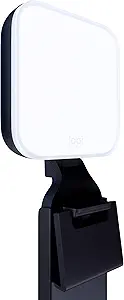 | Best Compact Monitor-Mounted Light | Model: Litra Glow | Color: Graphite | Light technology: TrueSoft full-spectrum LED | VIEW ON AMAZON | See Our Full Breakdown |
| GVM Pro SD650B 650W LED Video Light |  | Best for High-Output Studio Work | Power: 650W | Color temperature: 2700–6800K | Illumination: 81,300 lux at 1 m | VIEW ON AMAZON | See Our Full Breakdown |
| NEEWER CB100C 130W RGB COB LED Video Light with App and 2.4G Control |  | Best Compact RGB COB | Power: 130W | Illuminance: 27,000 lux/m | Color temperature: 2700–6500K | VIEW ON AMAZON | See Our Full Breakdown |
| NEEWER 660 PRO RGB LED Video Light with App Control, Barn Doors, and U Bracket |  | Best for Battery-Powered Panel Flexibility | Power: 50W | LEDs: 660 SMD LEDs: 170 cool, 170 warm, 320 RGB | Color temperature: 3200–5600K | VIEW ON AMAZON | See Our Full Breakdown |
| GVM 800D RGB LED Video Lighting Kit, 3-Pack |  | Best Multi-Light Kit | Quantity: 3 lights | Color temperature: 3200–5600K | RGB adjustment: Hue and saturation control, 0%–100% | VIEW ON AMAZON | See Our Full Breakdown |
| Nanlite FC-500B Bi-Color LED Video Light |  | Best Premium Bi-Color COB | Power: 520W | Color temperature: 2700–6500K | Color rendering: CRI 96; TLCI 98 | VIEW ON AMAZON | See Our Full Breakdown |
| led video light premium | Color temperature | Power |
|---|---|---|
| GVM RGB LED Video Light Panel | 3200K–5600K | — |
| LitONES Video Conference Light | 3000K–6500K | 18W AC plug |
| NEEWER FS150B 130W Bi-Color LE | 2700K–6500K | 130W |
| GVM 2-Pack Bi-Color LED Video | 2300K–6800K | 29W per light; DC 12V |
| Logitech Litra Glow Premium LE | — | USB-powered |
| GVM Pro SD650B 650W LED Video | 2700–6800K | 650W |
| NEEWER CB100C 130W RGB COB LED | 2700–6500K | 130W |
| NEEWER 660 PRO RGB LED Video L | 3200–5600K | 50W |
| GVM 800D RGB LED Video Lightin | 3200–5600K | — |
| Nanlite FC-500B Bi-Color LED V | 2700–6500K | 520W |
More Details on Our Top Picks
GVM RGB LED Video Light Panel Kit, 2-Pack
For creators who want color effects across a two-light setup, this kit offers a more flexible palette than the GVM 2-Pack Bi-Color LED Video Lighting Kit, which focuses on white light. The panels let me adjust color temperature from 3200K to 5600K and tune hue and saturation, while eight scene effects add quick options for stylized backgrounds or changing moods. App control and master/slave operation make it easier to coordinate both panels than adjusting each one separately. Their aerospace aluminum alloy housing is a useful build feature for a kit intended to move between setups. The tradeoff is that this panel kit is less suited to buyers seeking broad, modifier-ready COB lighting like the NEEWER FS150B. It can run from AC or optional Sony F750/970 batteries, but batteries are not included.
Pros:- Two RGB panels provide flexible key and background lighting
- Adjustable color temperature, hue, and saturation support both white-light and colored setups
- Eight scene effects and app or master/slave control add creative and operating flexibility
- AC and optional Sony F750/970 battery power support studio or portable use
Cons:- Sony F750/970 batteries are sold separately
- Panel format is less suited to Bowens-mount modifiers than the NEEWER FS150B
- 3200K–5600K color-temperature range is narrower than the bi-color GVM kit’s range
Best for: Video creators who want two coordinated RGB panels for interviews, streaming, and colored background effects.
Not ideal for: Buyers who need high-output COB lighting with Bowens modifiers or want a battery-ready kit without purchasing batteries separately.
- Model:800D
- Lighting type:RGB LED panel
- Pack size:2 panels
- Color temperature:3200K–5600K
- LED beads:168 LED and 84 RGB beads
- Scene effects:8
- Control:Mobile app and master/slave mode
- Power options:AC adapter or Sony F750/970 battery; batteries not included
Our verdict“Choose this two-pack if coordinated RGB panels and scene effects matter more than COB output or a wider bi-color range.”
LitONES Video Conference Light with Adjustable Swing Arm
The LitONES is built around desk convenience rather than the flexible studio coverage of the GVM panel kits or the NEEWER FS150B. Its 10–33-inch swing arm and rotating joints let me position the light above or beside a monitor, while the 7-inch head is designed to deliver soft, even illumination for calls and streaming. Three color modes and ten brightness levels provide practical adjustments without turning a workspace into a full lighting rig. Remote and touch controls, plus memory and timer functions, make it appealing for a light that stays set up day to day. The limits are tied to that desk-first design: it needs an AC outlet, and its clamp only fits desks up to 2.5 inches thick. Buyers looking for portable, stand-mounted video lighting should choose a panel kit instead.
Pros:- Adjustable swing arm makes it easy to position light around a monitor
- CRI greater than 95 and a soft-light design suit video calls and streaming
- Three color modes and ten brightness levels allow useful fine-tuning
- Remote and touch controls include memory and timer functions
Cons:- Requires an AC connection, limiting placement away from an outlet
- Desk clamp only fits surfaces up to 2.5 inches thick
- Desk-mounted form is less adaptable to a stand-based video setup than the GVM panel kits
Best for: Remote workers and streamers who want adjustable, softened face light mounted to a compatible desk.
Not ideal for: Mobile creators, users with desks thicker than 2.5 inches, or anyone who needs battery-powered lighting away from an outlet.
- Color rendering index:CRI >95
- Arm height adjustment:10–33 inches
- Lamp head size:7 inches
- Color temperature:3000K–6500K
- Color modes:3
- Brightness levels:10
- Power:18W AC plug
- Maximum clamp size:2.5 inches
Our verdict“Pick the LitONES for adjustable, everyday desk lighting, but skip it if your video work needs a portable or stand-mounted rig.”
NEEWER FS150B 130W Bi-Color LED Video Light
Among these options, the FS150B is the strongest fit for creators building a modifier-based lighting setup. Its Bowens mount accepts a range of light-shaping accessories, unlike the GVM panel kits, which offer a simpler direct-light approach. The 130W COB source reaches a stated 72,000 lux at 1 m, while 2700K–6500K adjustment and 1% dimming steps help match ambient light or make gradual exposure changes. CRI 97+ and TLCI 98+ support color-conscious video work, and app plus 2.4G wireless control can simplify group adjustments. The compact body and quiet cooling fan are practical advantages over larger studio fixtures. This is not a two-light kit, though, and its V-mount battery is separate; the included power cord also has a US plug.
Pros:- Bowens mount supports a broad range of light modifiers
- 2700K–6500K range and 1% dimming increments allow fine adjustments
- CRI 97+ and TLCI 98+ suit color-sensitive video production
- App and 2.4G wireless control complement the compact design and quiet fan
Cons:- V-mount battery is sold separately
- Included power cord has a US plug
- Single COB light does not provide the two-source coverage of either GVM two-pack
Best for: Video creators who want a compact COB key light with Bowens modifiers, precise dimming, and wireless control.
Not ideal for: Buyers who need two lights in one package, RGB color effects, or included battery power for location work.
- Model:FS150B
- Power:130W
- Maximum illuminance:72,000 lux at 1 m
- Color temperature:2700K–6500K
- Dimming:0–100% in 1% increments
- Color rendering:CRI 97+, TLCI 98+
- Special effects:12
- Mount and control:Bowens mount; app and 2.4G wireless control
- Power sources:AC adapter or V-mount battery, sold separately
Our verdict“Choose the FS150B if modifier flexibility and precise bi-color control matter more than a multi-light package or RGB effects.”
GVM 2-Pack Bi-Color LED Video Lighting Kit with App Control
This GVM kit is the most ready-to-assemble option here for a conventional two-light setup: it includes stands, barndoors, soft diffusers, adapters, and a carrying bag. Compared with the RGB GVM 2-Pack, it gives up hue and saturation control but spans a wider 2300K–6800K range, making it a better match for mixed ambient lighting and standard interviews. App control and an onboard digital display provide more than one way to adjust the lights, while CRI and TLCI ratings of 97+ support dependable color work. The listed 15,000-lux output is measured at just 20 inches, so I would not treat it as a guarantee of strong illumination across a large room. Optional Sony batteries add mobility, but they are not included.
Pros:- Two lights and stands provide a ready-made paired setup
- Includes barndoors, soft diffusers, adapters, and a carrying bag
- 2300K–6800K range suits varied ambient-light conditions
- CRI 97+ and TLCI 97+ support color accuracy
Cons:- Sony F550/F750/F970 batteries are not included
- 15,000-lux output figure is measured at only 20 inches
- Lacks the hue, saturation, and scene effects offered by the RGB GVM two-pack
Best for: Interviewers and small production teams who want two bi-color lights, stands, and basic shaping accessories in one kit.
Not ideal for: Creators who need RGB effects, strong illumination at longer distances, or portable operation without buying batteries separately.
- Pack contents:2 LED lights
- LEDs per light:480
- Color temperature:2300K–6800K
- Brightness range:10%–100%
- CRI and TLCI:97+ for both
- Power:29W per light; DC 12V
- Illuminance:15,000 lux at 20 inches
- Power options:AC adapter or compatible Sony F550/F750/F970 battery; batteries not included
- Included accessories:2 light stands, 2 barndoors, soft diffusers, power adapters, carrying bag
Our verdict“Pick this kit for a complete two-light bi-color setup with stands and accessories, not for RGB effects or long-distance output.”
Logitech Litra Glow Premium LED Streaming Light, Graphite
The Litra Glow is the simplest choice for a clean desktop setup: its three-way monitor mount adjusts height, tilt, and rotation without adding a desk clamp or light stand. A wide diffuser and TrueSoft full-spectrum LEDs are designed to soften the light, which can help reduce harsh shadows on camera. Brightness and color temperature are adjustable through onboard controls, with Logitech G HUB available for desktop control. Compared with the LitONES swing-arm light, the Litra Glow is more compact and monitor-focused, while the LitONES offers a longer arm and remote control. Compared with either GVM kit, this is not intended to cover a room or create a multi-light setup. USB power makes it easy to connect at a desk, but the desktop design limits where it works best.
Pros:- Wide diffuser and TrueSoft LEDs are designed for soft, flattering illumination
- Three-way monitor mount adjusts height, tilt, and rotation
- Brightness and color temperature can be adjusted
- USB-powered design suits a compact desktop setup
Cons:- Designed primarily for monitor or desktop use rather than studio placement
- Advanced desktop controls and presets require the G HUB app
- Does not offer the two-light coverage or included stands of the GVM kits
Best for: Streamers and video-call users who need soft, adjustable face lighting mounted directly to a monitor.
Not ideal for: Video crews needing stand-mounted coverage, battery operation, or multiple lights for larger scenes.
- Model:Litra Glow
- Color:Graphite
- Light technology:TrueSoft full-spectrum LED
- Controls:Adjustable brightness and color temperature
- Mount:Three-way monitor mount with adjustable height, tilt, and rotation
- Power:USB-powered
- Software:Logitech G HUB
Our verdict“Choose the Litra Glow for straightforward, soft monitor-mounted lighting, but choose a panel kit for broader video coverage.”
GVM Pro SD650B 650W LED Video Light
For demanding studio setups, the 650W output and stated 81,300 lux at one meter put the GVM Pro SD650B in a different class from the smaller NEEWER CB100C and the panel-style NEEWER 660 PRO RGB. Its 2700–6800K range gives more room to match ambient light or shape a scene, while CRI/TLCI 97+ supports color-conscious production. The Bowens mount lets me pair it with compatible modifiers, and app, group, and DMX control suit multi-light workflows better than simpler panel controls. Fine 0.1% dimming steps help with precise output adjustments. The tradeoff is a mains-oriented studio setup rather than a compact, battery-ready light, and the dual fans can still be audible despite the listed noise level. Included accessories beyond a cover are not specified, so I would check what a kit includes before planning a modifier-heavy setup.
Pros:- High stated output of 81,300 lux at one meter for shaping larger scenes
- CRI/TLCI 97+ and adjustable 2700–6800K color temperature
- App, group, and 8-bit or 16-bit DMX control support more complex setups
- Bowens mount accepts a wide range of compatible modifiers
Cons:- Dual fans may be audible during quiet dialogue recording
- Product information does not detail included modifiers or other accessories
- A 650W COB light is less suited to portable, battery-led shooting than smaller options
Best for: Studio cinematographers and lighting crews who need a powerful, color-accurate COB source with Bowens modifiers and DMX integration.
Not ideal for: Solo creators seeking a lightweight, battery-powered light or anyone recording close to the fixture who cannot tolerate fan noise.
- Power:650W
- Color temperature:2700–6800K
- Illumination:81,300 lux at 1 m
- Color accuracy:CRI/TLCI 97+
- Brightness adjustment:0–100% in 0.1% increments
- Lighting effects:12
- Control methods:On-device, GVM app, DMX 8-bit or 16-bit
- Mount and fan noise:Bowens mount; under 40 dB at 100% brightness
Our verdict“Choose the SD650B for high-output studio work where DMX control and Bowens compatibility matter more than portability and near-silent operation.”
NEEWER CB100C 130W RGB COB LED Video Light with App and 2.4G Control
The NEEWER CB100C combines a 130W COB source with CCT, full-color HSI, and 17 effects, making it a flexible choice for smaller studios that want more than white light. Compared with the much more powerful GVM Pro SD650B, it gives up substantial output and DMX support, but its RGB color modes make quick accent colors and effects accessible without extra fixtures. App and 2.4G control offer useful wireless options, and the Bowens mount opens the door to compatible modifiers. Its CRI 97+ and TLCI 98+ ratings suit color-sensitive video. The main compromise is power flexibility: it requires a power cable, unlike the NEEWER 660 PRO RGB’s optional NP-F battery operation. The fan may also speed up as the light warms, which can matter in close-miked rooms.
Pros:- CCT, full-color HSI, and 17 effects cover both conventional and stylized lighting
- CRI 97+ and TLCI 98+ support accurate color reproduction
- App and 2.4G wireless control provide alternatives to adjusting the fixture directly
- Bowens mount accepts compatible modifiers
Cons:- Requires a power cable, limiting use away from outlets
- Fan speed can increase as the light reaches operating temperature
- Its 130W output is far below the GVM Pro SD650B for lighting larger scenes
Best for: Small-studio creators who want a modifier-compatible COB light with RGB effects and app or wireless control.
Not ideal for: Location shooters who need battery operation, or large-set crews who need the output and DMX workflow of the GVM Pro SD650B.
- Power:130W
- Illuminance:27,000 lux/m
- Color temperature:2700–6500K
- Color rendering:CRI 97+, TLCI 98+
- Lighting modes:CCT, HSI, FX
- Scene effects:17
- Wireless control:App to 50 ft / 15 m; 2.4G to 66 ft / 20 m
- Mount and weight:Bowens mount; 2.47 kg
Our verdict“Pick the CB100C for a compact, RGB-capable COB setup with wireless control, provided cable power and fan noise fit your shooting space.”
NEEWER 660 PRO RGB LED Video Light with App Control, Barn Doors, and U Bracket
The NEEWER 660 PRO RGB takes a different route from the COB fixtures in this roundup: its 50W panel format spreads light across 660 LEDs and includes barn doors, a diffuser, and a U bracket. That makes it a practical option for interviews, desk setups, and mobile shoots where shaping a broad source matters more than the punch of the GVM Pro SD650B or Nanlite FC-500B. Its RGB hue and saturation controls, bi-color adjustment, app control, and nine effects provide plenty of creative range for a panel. It can run from AC or optional NP-F batteries, although those batteries and a stand are not included. The narrower 3200–5600K range offers less flexibility than the COB lights’ wider spans, and this panel is not the choice for high-output scene lighting.
Pros:- Panel design provides a broad source for interviews and close-range video
- RGB hue, saturation, and bi-color adjustment support varied looks
- Barn doors, U bracket, and diffuser are included
- AC power is included, with optional NP-F battery compatibility
Cons:- NP-F batteries and tripod light stand are not included
- 3200–5600K range is narrower than the ranges on the COB options
- 50W panel output is less suited to lighting larger scenes than the GVM Pro SD650B
Best for: Interviewers and mobile video creators who want a ready-to-shape RGB panel and may use NP-F batteries on location.
Not ideal for: Crews needing high-intensity output, a Bowens modifier ecosystem, or included batteries and a light stand.
- Power:50W
- LEDs:660 SMD LEDs: 170 cool, 170 warm, 320 RGB
- Color temperature:3200–5600K
- Color rendering:CRI 97+
- RGB adjustment:Hue 0°–360°; saturation 0%–100%
- Lighting effects:9
- Controls:On-panel and app control
- Power and included accessories:AC adapter; optional NP-F550/NP-F970 batteries; barn doors, U bracket, diffuser
Our verdict“Choose this panel for close-range work where built-in shaping tools and optional battery power matter more than COB-level output.”
GVM 800D RGB LED Video Lighting Kit, 3-Pack
The GVM 800D kit’s defining advantage is straightforward: three RGB panels in one set make it easier to build a key, fill, and background arrangement than buying a single fixture such as the NEEWER 660 PRO RGB. Each light offers adjustable 3200–5600K color, RGB control, and eight scene effects, while app operation and LCD displays help manage adjustments across a setup. The rotating U brackets add placement flexibility, and the aluminum housings are designed to dissipate heat. This kit suits creators who need several sources more than those seeking the punch of a single high-output COB like the Nanlite FC-500B. A major limitation is that the supplied product information does not state power or light output, making it difficult to judge brightness against the other options. I would choose it for coverage and fixture count, not for a specified intensity target.
Pros:- Three lights support key, fill, and background arrangements from one kit
- Adjustable color temperature and RGB control offer varied looks
- App control and LCD displays help manage settings
- Rotating U brackets support flexible mounting and positioning
Cons:- Product information does not specify power or light output
- 3200–5600K color-temperature range is narrower than the COB options
- Three panels take more setup and placement space than a single fixture
Best for: Small production teams and creators who need three RGB-capable fixtures for multi-angle, interview, or background lighting.
Not ideal for: Buyers who need verified output figures or a single powerful source for lighting larger spaces.
- Quantity:3 lights
- Color temperature:3200–5600K
- RGB adjustment:Hue and saturation control, 0%–100%
- Scene effects:8
- Control:Mobile app and on-light controls
- Display:LCD digital display
- Mount:360-degree rotating U bracket
- Housing:Aerospace aluminum alloy
Our verdict“Choose the 800D kit when a coordinated three-light arrangement matters more than documented output or maximum single-fixture intensity.”
Nanlite FC-500B Bi-Color LED Video Light
The Nanlite FC-500B is the focused choice for crews who want a high-output bi-color COB without prioritizing RGB effects. Its 520W rating and 2700–6500K span place it closer to the GVM Pro SD650B than to the 130W NEEWER CB100C, while the CRI 96 and TLCI 98 figures support color-conscious production. Onboard controls, Bluetooth app, 2.4G remote, and DMX give it several paths into a studio workflow; the Bowens-style mount also accommodates compatible modifiers. Compared with the GVM, it lists slightly less power and a slightly narrower upper color-temperature limit, and its supplied information does not name scene effects or fine dimming steps. The active fan is another tradeoff for quiet recording environments. This is a strong fit when dependable bi-color control and multiple operating methods matter more than RGB color effects.
Pros:- 520W power and a 2700–6500K range suit substantial studio lighting work
- CRI 96 and TLCI 98 support color accuracy
- Onboard, Bluetooth app, 2.4G remote, and DMX control are available
- Bowens-style mount accepts compatible lighting modifiers
Cons:- Active cooling fan may produce noise during quiet recordings
- Bi-color output does not provide the RGB modes offered by the NEEWER CB100C
- Listed power is lower than the GVM Pro SD650B, and product information does not specify output lux
Best for: Professional video crews seeking a powerful, color-accurate bi-color COB with DMX and wireless control options.
Not ideal for: Creators who need RGB effects, documented fine dimming increments, or a fixture suitable for noise-sensitive close-mic recording.
- Power:520W
- Color temperature:2700–6500K
- Color rendering:CRI 96; TLCI 98
- Control options:Onboard controls, Bluetooth app, 2.4G remote, DMX
- Mount:Bowens-style
- Cooling:Active fan
Our verdict“Pick the FC-500B for a premium bi-color COB workflow with DMX and wireless controls, unless RGB effects or silent operation are priorities.”

How We Picked
I ranked these lights by how well their design fits a real production need, not by assuming that more wattage or more fixtures always means a better buy. My main criteria were usable output for the product’s intended role, control over color temperature and RGB effects, practical mounting and app or remote control, and how readily each option can form a workable lighting setup. I also weighed the physical footprint: a desk-mounted streaming light has a different job from a high-output fixture meant for a studio.
The ranking favors versatile options that can serve a broad range of video work without pushing buyers into unnecessary complexity. The FS150B leads as a focused bi-color option; the FC-500B and SD650B suit buyers who put more weight on output and production headroom. Multi-light GVM kits rank well for coverage, while compact and specialist lights rank for their specific settings rather than as universal studio choices. Product details supplied for this roundup do not provide comparable measurements for every model, so I avoid treating claimed power or kit size alone as proof of superior real-world performance.
Factors to Consider When Choosing Led Video Light Premium
Before choosing a premium video light, decide what your lighting setup needs to do repeatedly—not just what features sound appealing. Output, color control, fixture shape, and room to mount the light work together, and a mismatch can leave an expensive fixture unused.
Choose the Light Shape for the Job
COB lights concentrate their output into a compact source and are a natural fit when you want a key light aimed at one subject or paired with light-shaping accessories. Panels spread light across a broader face, which can suit interviews, tabletop work, or fill lighting without the same concentrated beam. Neither form is automatically softer: softness depends on the apparent size of the source from the subject’s position, often shaped by diffusion. A common mistake is choosing by fixture type alone while ignoring how close it can sit to the subject. Before buying, sketch where your camera, subject, and stands can go, then check whether the light’s form supports that arrangement.
Match Output to Distance and Diffusion
A light’s output matters most in relation to how far it is from the subject and how much diffusion or other light-shaping material you place in front of it. Diffusion can make a source more flattering, but it also reduces the light reaching the subject. That is why a higher-output option such as the FC-500B or GVM Pro SD650B may make sense for larger spaces, greater distance, or more demanding setups, while a compact streaming fixture can suit a nearby face. Avoid buying power as a proxy for quality if your subject will sit close to the light in a small room. Think about the brightest ambient conditions you need to overcome and leave room to adjust the light rather than running every fixture at its limit.
Decide Whether You Need RGB or Reliable White Light
Bi-color control lets you adjust white light to better match a room or other fixtures, which can simplify interviews and routine content production. RGB adds options for colored backgrounds, accents, and stylized effects, but those effects may not be useful on every shoot. For regular face lighting, a capable white-light fixture may offer a more direct path to consistent results than paying for color effects you rarely use. A mixed setup can also be sensible: use a bi-color light on the subject and reserve an RGB panel for background color. Before selecting RGB, ask whether the color work is a repeatable part of your production or an occasional experiment.
Plan for Mounting, Space, and Daily Setup
Mounting can decide whether a light fits your workflow more than a feature list does. A swing-arm desk light such as the LitONES or Logitech Litra Glow can leave a small streaming desk less cluttered, while larger studio fixtures and multi-light kits need suitable stands, clearance, and storage. Count the outlets and mounting points your complete setup will use, not just those for the main light. A multi-light kit can reduce the effort of matching separate fixtures, yet it also adds cables and placement decisions. If you regularly pack away your workspace, favor a simpler footprint over extra fixtures that are difficult to store.
Treat Controls as Part of the Workflow
App control, onboard controls, and included remotes can each be useful, but only if they suit how you adjust lights during a shoot. App control can help when fixtures are out of reach or arranged in a group; physical controls remain helpful when you want a quick change without opening another device. Check whether the listed control method supports the way you plan to work, especially if you want to coordinate more than one light. Do not assume that app control by itself makes a fixture easier to operate; it can add setup steps and depend on a compatible phone. For a one-light desk setup, easy reach may matter more than remote features, while a larger rig can benefit from centralized adjustments.
Pay for Headroom Only When You Can Use It
Higher-output fixtures earn their place when you need distance, diffusion, or flexibility for changing production setups, not simply because a larger number looks reassuring. A smaller fixture may be the more useful choice if your room is tight, the subject is close, and your content uses a stable setup. Conversely, a low-output light can become limiting if you later add diffusion or need to light more than one person. Consider the next likely change in your work—such as a second camera angle, a larger set, or more controlled background lighting—before settling on a single fixture. Spending on headroom makes sense when it replaces a real limitation; otherwise, a better-matched mount or a second light may improve the setup more.
Frequently Asked Questions
Should I choose the NEEWER FS150B or the Nanlite FC-500B for a small studio?
Start with the distance between the light and your subject, plus whether you expect to use diffusion. The FS150B is the more restrained choice for a compact studio where a 130W bi-color fixture fits the intended setup. The FC-500B is better suited to buyers who need more output headroom for larger spaces or light-shaping accessories. More output is not automatically an advantage if it makes placement harder or goes unused. Choose the FC-500B for demanding setups; choose the FS150B when a simpler bi-color studio light is enough.
Is a two-light kit a better first purchase than one powerful light?
It depends on whether your immediate problem is coverage or output. Two fixtures can let you light a subject and background, or create a key-and-fill arrangement, without needing to buy a second light right away. One stronger fixture can be the better start if you primarily need a key light with room for diffusion or distance. Multi-light kits also require more space, power access, and time to position. If you are unsure, map out the shot you make most often and decide whether it needs another angle of light or more light from one position.
Do I need RGB for interviews and video calls?
Usually not for the main light on a face: adjustable white light is often the more direct tool for matching room lighting and keeping a natural look. RGB can be useful when you want a colored background, an accent, or a distinct visual style, but it adds little if your setup stays neutral. The lineup includes both RGB options, such as the NEEWER CB100C and GVM panels, and bi-color choices like the FS150B. A practical compromise is to begin with a dependable white-light source and add RGB later if your content calls for it. Choose RGB first only when colored effects are a regular part of the work.
Which light is the best fit for a desk streaming setup?
For a desk where floor space and fast positioning matter, compare the Logitech Litra Glow and LitONES swing-arm light with full-size studio fixtures. Their compact, desk-oriented formats can be easier to place near a monitor than a COB light on a stand or a multi-panel kit. Larger fixtures offer a more production-oriented setup but may crowd a small workspace. Also check where the mount attaches and whether it leaves room for your monitor, camera, and microphone. If you record varied scenes or need lighting beyond your desk, a studio fixture may be a more flexible long-term choice.
When does a high-output light make more sense than a multi-light kit?
A high-output fixture is a stronger fit when you need to place one key light farther away, work through diffusion, or maintain headroom as your setup changes. A multi-light kit makes more sense when you need separate sources for the subject, fill, and background, or when broad coverage is more useful than concentrated output. The GVM three-pack offers multiple fixtures, whereas the GVM Pro SD650B is a single high-output option. Remember that extra fixtures do not automatically create a balanced setup; they still need thoughtful placement and control. Choose based on the shape of your lighting problem, not the number of lights or the power figure alone.
Conclusion
For most buyers seeking a versatile studio fixture, my best overall pick is the NEEWER FS150B, which pairs bi-color control with a focused 130W format. For best value in a ready-made setup, the GVM 2-Pack Bi-Color Kit offers two fixtures for buyers who need broader coverage; the GVM 800D three-pack suits those who want even more sources and have room to place them. The best premium output choice is the Nanlite FC-500B, while the GVM Pro SD650B is a specialized alternative for buyers whose work calls for a powerful single fixture. For beginners streaming at a desk, the Logitech Litra Glow or LitONES swing-arm light is easier to fit into a compact workspace than a studio rig. Choose the NEEWER CB100C or a GVM RGB kit for color effects, and the NEEWER 660 PRO RGB when you want a panel with barn doors and app control. Match the light to your space and most frequent shoot before paying for output, color features, or extra fixtures you may not use.