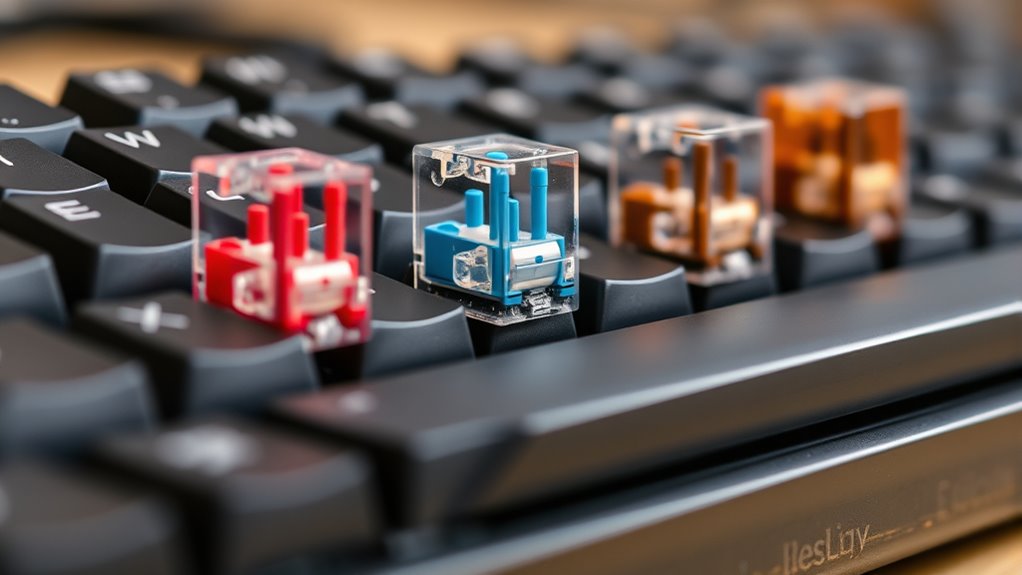
Mechanical keyboard switches come in three main types: clicky, tactile, and linear. Clicky switches give you a noticeable bump and loud sound, great for feedback but loud for shared spaces. Tactile switches provide a gentle bump without much noise, balancing feel and quietness. Linear switches are smooth and quiet, ideal for fast, quiet typing. Want to find out which switch best suits your style? Keep exploring to discover more about each type.
Key Takeaways
- Mechanical switches are classified into clicky, tactile, and linear, each offering different feedback and noise levels.
- Clicky switches provide audible and tactile feedback, ideal for responsive typing, but are louder.
- Linear switches are smooth and quiet, suitable for quieter environments and overall minimal resistance.
- Switch feel impacts typing speed, accuracy, and overall comfort, allowing customization based on personal preference.
- The noise level of switches influences suitability in shared or quiet spaces, with quieter options like Cherry MX Red preferred.
Are mechanical keyboards worth the hype? You might wonder if they truly make a difference compared to membrane models. The answer depends on what you’re looking for in your typing experience. One of the most noticeable aspects is the switch feel. Mechanical switches come in various types, each offering a different tactile response. Some feel clicky and tactile, giving you a noticeable bump with each keystroke, while others are smoother and more linear. If you prefer a more responsive and satisfying feel, mechanical switches deliver that sense of precision that membrane keyboards often lack. The switch feel can influence your typing speed and accuracy, especially if you type for hours daily.
Another factor to contemplate is typing noise. Mechanical switches are generally louder than membrane keyboards, especially those with clicky switches designed to provide auditory feedback. If you work in an office or shared space, this noise might be a concern, but if you’re in a private setting, it can actually enhance the typing experience by providing satisfying auditory cues. Some switches are quieter, like linear switches, which produce minimal noise and are ideal for quiet environments. Others, like clicky switches, emit a distinctive sound that some users find enjoyable, almost like a satisfying click with each keystroke. The noise level directly correlates with the switch type, so your choice can be profoundly impactful on your comfort and your surroundings.
The variety in switch feel and typing noise means you can customize your keyboard to match your preferences. If you want a tactile bump and a satisfying click, switches like Cherry MX Blue might be your go-to. If you prefer a smooth, quiet keystroke, linear switches like Cherry MX Red could suit you better. Testing different switches before making a purchase is wise because switch feel is highly personal. You get the tactile feedback you want, and the noise level you’re comfortable with, all tailored to your typing style.
Frequently Asked Questions
How Do I Choose the Right Switch for Gaming?
To choose the right switch for gaming, consider your preference for switch durability and ergonomic benefits. Opt for switches with high durability if you game intensively, as they withstand frequent use. Linear switches offer smooth, effortless keystrokes ideal for rapid actions, while tactile switches provide feedback for better control. Balance comfort with performance, and try different switch types if possible, ensuring your gaming experience feels comfortable and responsive.
Are Mechanical Keyboards Suitable for Travel?
Think of your mechanical keyboard as a trusty steed from a knight’s tale; it’s not always the best for travel. While some models are portable and have travel-friendly features, they often lack the compactness and lightweight design ideal for on-the-go use. If you prioritize portability and ergonomic comfort, look for smaller, wireless options. Otherwise, a full-sized mechanical keyboard might be cumbersome during your adventures, making it less suitable for travel.
Can Switch Types Affect Typing Speed?
Yes, switch types can affect your typing speed. You’ll notice differences in switch responsiveness, which impacts how quickly your keystrokes register. Some switches offer quicker actuation, allowing for faster typing, while others may enhance typing accuracy with more tactile feedback. Choosing the right switch depends on your preferences; if you prioritize speed, opt for responsive switches. For better accuracy, tactile or clicky switches might suit you better.
What Maintenance Is Required for Mechanical Switches?
Did you know proper maintenance can extend your switch lifespan by up to 50%? To keep your mechanical switches in top shape, you should regularly perform switch cleaning to remove dust and debris. Additionally, switch lubrication reduces friction, improves keystroke smoothness, and minimizes noise. With consistent switch lubrication and cleaning, your keyboard remains responsive and durable, ensuring a better typing experience for years to come.
Do Different Switch Types Impact Noise Levels?
Yes, different switch types impact noise levels. For example, clicky switches produce more sound, while linear switches are quieter due to less sound dampening. Tactile switches offer a balance but still generate some noise. Your choice affects sound dampening and switch durability; softer switches might wear out faster, while sturdier ones maintain silence longer. Consider your environment and preference to pick the right switch type for quieter typing.
Conclusion
Now that you know the different switch types, you’re ready to revolutionize your typing experience. Imagine typing so smoothly and swiftly that your keyboard becomes an extension of your mind—transforming every keystroke into pure perfection. With the right switch, you’ll never settle for anything less than extraordinary. Get ready to elevate your gaming, coding, or everyday tasks to epic levels, making your keyboard the most powerful tool you’ve ever wielded. The future of your typing journey starts now!